Visualizzazione post con etichetta development. Mostra tutti i post

martedì 18 giugno 2013

EJB smart lookup

I want to post a nice solution i found for looking up the EJB, easy and simple.
It follows the KISS idea, Keep It Simple and Strong.
Part of this solution is a contribution of Massimiliano.
Let's start from this idea:
I want to provide to the user a library that is capable to lookup enterprise beans, without telling him anything about the class that implements the exposed interfaces.

I have many enterprise beans in my application, one of the is for example the account manager:


import javax.ejb.Remote;
import javax.ejb.Stateless;
...
...
@Stateless(name = "Account")
@Remote(IAccount.class)

public class AccountManager implements IAccount {
...
}

This class implements the interface IAccount.  It is and EJB stateless bean, and the name used to look up this stateless bean is Account. Telling the name of the bean is the first step. Doing so we know the name we have to use for the lookup.
Once deployed the EJB projects an output like this:

java:global/MyBankLogicEAR/MyBankLogic/Account!main.IAccount
java:app/MyBankLogic/Account!main.IAccount
java:module/Account!main.IAccount
java:jboss/exported/MyBankLogicEAR/MyBankLogic/Account!main.IAccount
java:global/MyBankLogicEAR/MyBankLogic/Account
java:app/MyBankLogic/Account
java:module/Account


We need to consider the red part, to look up the EJB. Removing the name of the bean the red part would look like /MyBankLogicEAR/MyBankLogic/NameOfThePackage.AccountManager!main.IAccount

As already said, I want the user NOT to be aware of the path, the name and just avoid him all the problems of looking up the beans.

This said let's take a look at the code produced by Massimiliano:
final Hashtable jndiProperties = new Hashtable();
jndiProperties.put(Context.URL_PKG_PREFIXES, "org.jboss.ejb.client.naming");
try {
            final Context context = new InitialContext(jndiProperties);
            String appName = "";
            String moduleName = "jboss-firstbean";
            String distinctName = "";
            String beanName = "FirstBean";
            String interfaceFullName = "ejb.RemoteFirstBean";
            final String jndi = "ejb:" + appName + "/" + moduleName + "/" + distinctName + "/" + beanName + "!" + viewClassName;
            RemoteFirstBean statelessRemote = (RemoteFirstBean)context.lookup(jndi);

        } catch (NamingException ex) {
            System.out.println("problems");
        }
this is part of the post access EJB on jboss as 7. You may refer to it for more detailed explanations.
Thus this said, i want to avoid the user to use this snipped of code, but instead just tell which interface implementation he wants to lookup.
Interfaces are common among the client and the server, and shares the accessible remote methods. A part these methods, user must NOT be aware of everything else.

This is the solution i propose:
package utility;


import java.util.Hashtable;
import javax.naming.Context;
import javax.naming.InitialContext;
import javax.naming.NamingException;


public class Lookup<tipo>{

 private static final Hashtable jndiProperties = new Hashtable();
 private static final String appname = "MyBankLogicEAR";
 private static final String modulename = "MyBankLogic";
 private static final String distname = "";
 private static Context context;
 private Boolean isStateless = true;
 private String interfaceName = "";

 public Lookup(Boolean isStateLess, Class <Tipo> classe) {
  this.isStateless = isStateLess;
  this.interfaceName = classe.getName();
 }
 public <Tipo> Tipo lookup() throws Exception{
  Tipo res = null;
  String beanName = "";
  switch (interfaceName) {
  case "main.IAccount":
   beanName = "Account";
   break;
  case "main.ICliente":
   beanName = "Cliente";
   break;
  case "main.ICommonOperation":
   beanName = "Common";
   break;
  case "main.IDipendente":
   beanName = "Dipendente";
   break;
  case "main.IServizi":
   beanName = "Servizi";
   break;
  case "main.IUser":
   beanName = "Login";
   break;
  case "main.IReportGeneration":
   beanName = "Report";
   break;
  default:
   beanName = "";
   break;

  }
  if(beanName.compareTo("")==0){
   return null;
  }
  res = lookup(beanName, interfaceName, isStateless);
  return res;

 }

 private <Tipo> Tipo lookup(String beanName, String interfaceName,
   boolean stateless) throws Exception{
  jndiProperties.put(Context.URL_PKG_PREFIXES,
    "org.jboss.ejb.client.naming");
  Object bean;
  try {

   context = new InitialContext(jndiProperties);
   String jndi = "ejb:" + appname + "/" + modulename + "/" + distname
     + "/" + beanName + "!" + interfaceName;
   if (!stateless) {
    jndi = jndi + "?stateful";
   }
   //System.out.println("jndi: " + jndi);
   bean = context.lookup(jndi);
   return (Tipo) bean;
  } catch (NamingException ex) {
   throw new Exception("Non posso fare il lookup all'EJB");
  }
 }

}
In this way the user with a simple code like:
            
IUser  u = new Lookup<IUser>(Boolean.FALSE, IUser.class).lookup();
Can lookup the EJB which is responsible to provide the methods exposed in the interface IUser.


This is very simple because programmers on server side are aware of the names of the beans, and they may also write an even complex code for look up, like a factory does. Hence they can provide a simple library with this class to lookup the beans.
It is strong because user just knows whether or not an EJB is stateless or not, thus thanks to the interface and using the library it can lookup beans on the Jboss as 7 without having any problem with the name of the application, the EAR,  or the module name.

EJB 3 lifecycle

Today we will see how stateful and stateless bean does live their life, thus this will be used in another article in order to do a tricky session managment.

The lifecycle

We must distinguish between stateless session bean and stateful session bean because their lifecycle is different.

Before describing the difference in the lifecycle, let's recall the diffrerences between stateful and stateless:


  • Stateful
    they use class variables that are kept across the "conversation" between client and server (bean).
    Thus is possible to declare global variable in the class that implements the EJB, and theese variables are hold among the different requests of the client.
    When the client terminates there are two options to be undertaken: the bean is removed or session ends, thus state disappears.

    This kind of EJB are less scalable, wtr to the stateless. This is due to the overhead introduced by the need to keep the conversational state (memory on server side, methods called to maintain the EJB...).


  • Stateless
    They do not use class variables,  it will be useless because they die after the method call.

    They are throwaway enterprise beans. Thus by this feature their usage result in a more easy scalable application building. This type of beans can serve different clients at the same moment, without keeping track the about the session management. Hence there is no overhead for the server which is less stressed by the usage of this type of beans.

Let's take a look at the lifecycle now. Let's start by the latest one described above.


Stateless bean lifecycle
  • Stateless


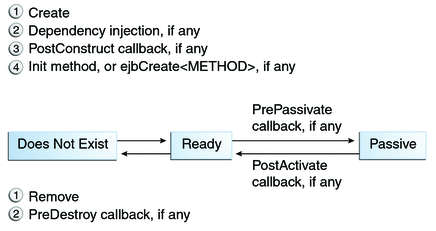
    Stateless'bean lifecycle is described by the image here on the side.
    Very simply: 2 states for this state machine. The bean does not exist when is waiting to be called by the client. Once upon the bean is called it goes to the state ready. During this phase/state the bean can compute and perform the operation requested by the client through the remote method invocation. Hence once the method is terminated the bean goes back to does not exists.
    We can notice that there are:
    1. NO PASSIVATION
    2. NO ACTIVATION
Stateful bean lifecycle
  • Stateful

    Stateful beans add more than what the stateless offers. The basic concept remains the same.
    There are the does not exist state and the ready state, but further there is a state which is passive.
    This state is coming out from the need of maintaing the session, thus the variables. Once up on the bean is created is not destroyed when the first method invocation finishes, but is remains ready to satisfy other client requests. Anyhow the memory of the server may be used by other beans, or in general by other tasks, thus the bean is passivated and removed by the memory. From the oracle docs we can read "(Typically, the EJB container uses a least-recently-used algorithm to select a bean for passivation.) ".
    We can notice the need of:
    1. PASSIVATION. Used to move from the primary memory (ram probably) to a secondary memory on the server (cache, hard disk, raw memory)
    2. ACTIVATION. Used to bring back from secondary memory the bean, thus placing it in the primary memory ready to be called and serve the client.

Note that every step may be controlled through the annotation, we may for example want to run a task upon the Passivation or Activation of the bean, as well as when is Created or Removed.

We will see how to do a tricky session management with a stateful session bean in another article.


Sources:

Roseinda EJB tutotial session bean
docs oracle
image sources
roseinda
docs oracle


sabato 22 dicembre 2012

Interfaces: Remote vs Local

Many of you may be confused as i was upon the terminology and the usage of interfaces.
Should they be remote? or should they be local?

IT DEPENDS.

Nice question, weird anser. Depends is always a good answer but I will explain here my point of view, after having read here and there some hints.

When you design your appliaction you first decide what it has to do, and doing so, you will decide the logic that your EJB will hold.
The separation between the "Logic"(hold by the EJB tier) and the "Presentation"(hold by the web application, or generally your client) following the EJB architecture is foundamental, and here it comes the time to decide what you want your client to be.

i.e. Suppose you want your logic to implement a calculator, you will provide sum, subtraction, multiplication and division through EJB.

The interfaces are just the view exposed to the client of your Logic, without knowing of course how it is implemented.

i.e. your client will provide a sort of gui or some input methods for the numbers and the operation you want to do, hence calling the EJB it will perform the computation.

At this point you may wonder where you should have your client.

At the very beginning EJB was meant to provide remote access throught RMI standard, so the client was meant to be on a different machine from the one who acted as container for EJBs (remote).
Moving to version 2.0 the Java EE team decided to provide also a different approch to EJB. You wonder: why should i run through RMI, sockets and network connection when i have the client on the same JVM as the EJB container?
So they introduced the local interface that allows the client to call directly methods on bean, bypassing the RMI sematics(local), you will find that you write local interfaces in some special cases.

How much good is this idea to have it local?? I can't say. Still you should have a stub and a skeleton as the RMI paradigm impose, but you don't have the network in the middle because the client and the server(ejb container) run on the same java virtual machine and hence on the same heap.
Instead with the remote interface you have two different JVM and two different heaps.

Anyhow, you have to choose based on your client-program. For sure you will not have both the implementation, it will be useless. Think about it, should you have a remote interface and a local interface that expose the same things? or partial things on the remote and partial on local?

Furthermore in my opinion i think that if you are going to use EJB to provide the logics, your client will be running on a different machine.


other sources:
http://stackoverflow.com/questions/3807662/ejbs-when-to-use-remote-and-or-local-interfaces
http://stackoverflow.com/questions/1385717/why-do-we-need-separate-remote-and-local-interfaces-for-ejb-3-0-session-beans

book: Head first EJB

venerdì 21 dicembre 2012

Integrated Development Environment

There are very many tools that you may want to use for programming in your favourite language.
I will suggest some, that i found really very much helpful.

Since we're going to program with Java, the main IDEs available on line are in my opinion:
Icon di netbeans
  • Netbeans
    current version (at the date of writing) 7.2 with a 7.3 beta version available
    You can find Netbeans here:
    http://netbeans.org/


Icon di Eclipse


Both runs on Mac OS systems, Windows and linux based OS (mostly Debian distro derived like Ubuntu, Kubuntu etc etc)

Personally i like more Netbeans, don't ask me why because it would take too long to be explained.
For the purpose of programming for the web, testing or learning a new technology i suggest Netbeans in its full version (which supports also other programming languages like c/c++..).
Furthermore Netbeans come along with:
  • Glassfish server version 3.1.2 (may vary)
  • Apache Tomcat 7.0.27 (may vary)
Anyhow there will be some things that, for the sake of semplicity, we will do using Eclipse!
For the purpose of showing how does some technology works we will explain in another post how to install and configure JBoss which is another server Java EE compliant as Glassfish is.

Theese are the tools we're going to use. You will choose the Environment that you like more.
I think that an IDE helps a lot for programming, and simplify the life of programmers but you can still write code using:
  • gedit
  • notepad++
for example and feel to compile a part and run programs through the shell as well.